
SCCM ConfigMgr Current Branch Backup Recovery Options 4

SCCM ConfigMgr Current Branch Backup Recovery Options

Let’s discuss the SCCM ConfigMgr Current Branch Backup Recovery Options | Configuration Manager | Endpoint Manager. This post contains a collection of video tutorials that I created last year to help you better understand the backup and recovery process of the SCCM ConfigMgr Current Branch (CB).

As part of the website revamp, I checked whether the posts were okay, and this series of SCCM/ConfigMgr CB backup and recovery posts came to my attention. SCCM ConfigMgr Current Branch Backup Recovery Options?

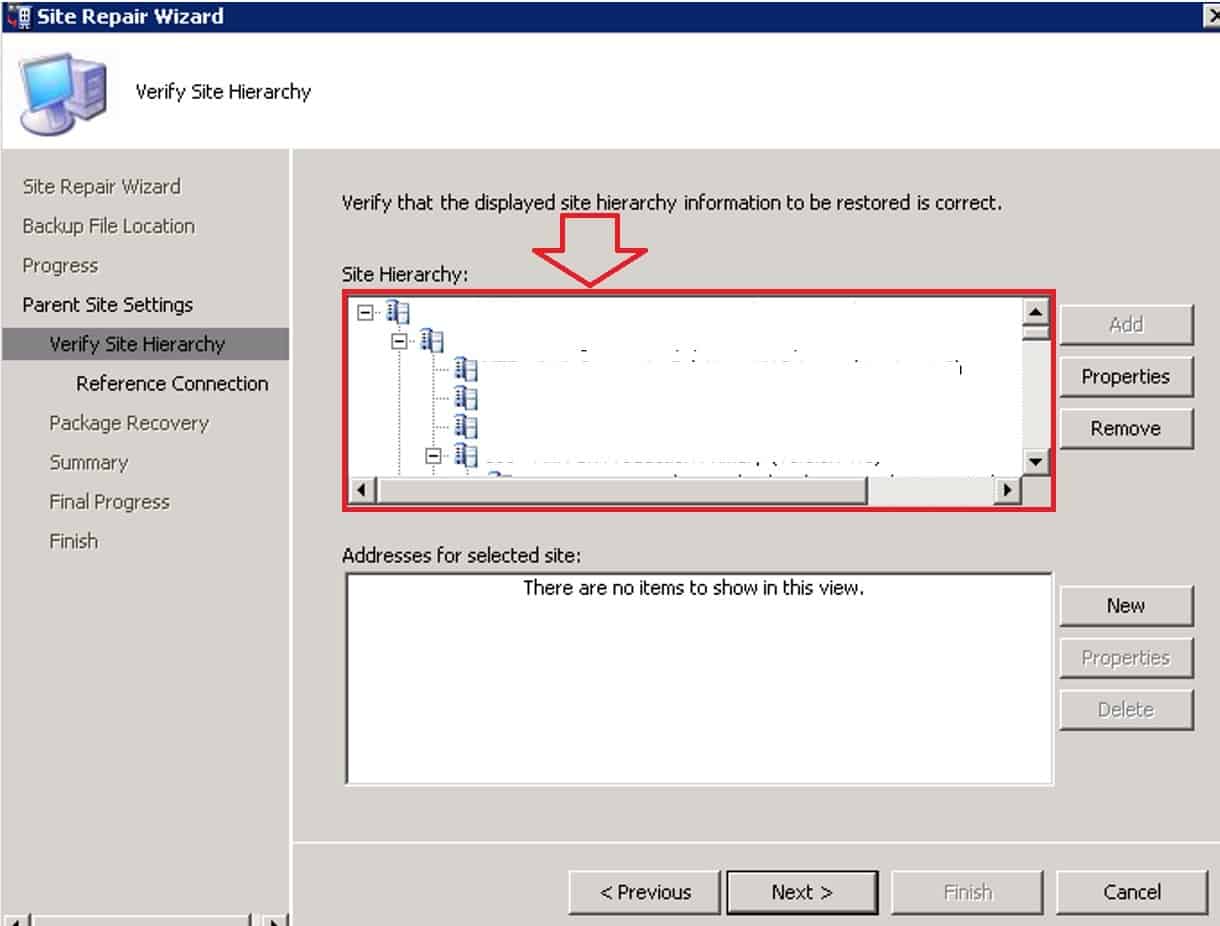
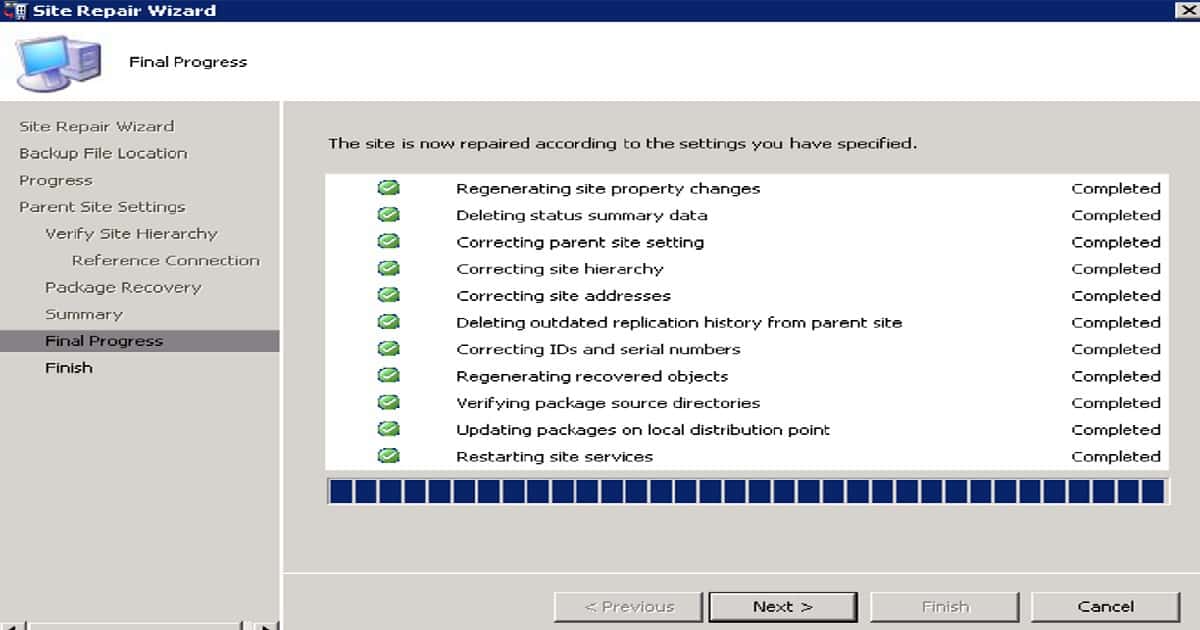
These videos should give you an overview of the entire backup and recovery process, with different scenarios, such as restoring with a full native SCCM ConfigMgr CB backup.

Also, backup and restore only using SQL backup, etc..CD.LATEST folder is another big change in the backup and recovery process if you compare SCCM 2012 and SCCM CB. I wish that none of us (SCCM Admins) should be in a situation where we must restore our site from backup! But be ready for the worst case.

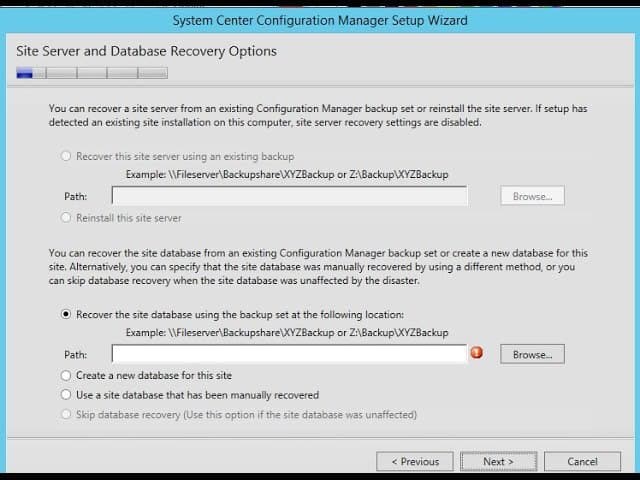
How to Recover or Restore the SCCM CB Primary Server using SQL Database Backup

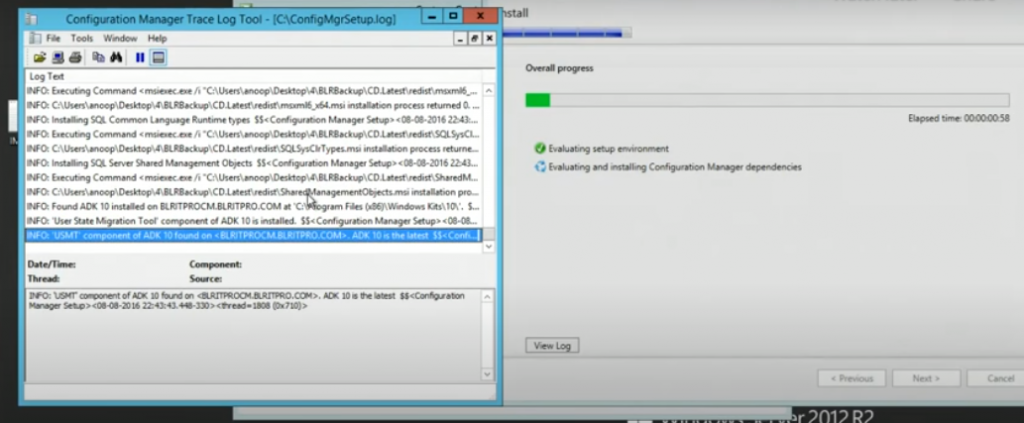
In this video, I’ll show you how to restore your SCCM CB 1606 primary server, especially if you’re using Intune Hybrid, using an SQL database backup. The key is that you don’t need a full backup of SCCM CB to get your primary server back up and running.

SCCM ConfigMgr Current Branch Backup Recovery Options – Video 1

Introduction – SCCM ConfigMgr Current Branch Backup Recovery Options | Configuration Manager | Endpoint Manager

The following are the posts you can refer to for each scenario. I’m still planning to create the last couple of videos in this series, which will cover the backup and restore of the SCCM/ConfigMgr CB CAS server either from native SCCM backup or from SQL backup.

How to Plan Backup and Recovery for SCCM ConfigMgr CB

SCCM ConfigMgr Current Branch Backup Recovery Options | Configuration Manager | Endpoint Manager? This post contains a collection of video tutorials that I created last year to help you better understand the backup and recovery process of the SCCM ConfigMgr Current Branch (CB).

As part of the website revamp, I checked whether the posts were okay, and this series of SCCM/ConfigMgr CB backup and recovery posts came to my attention.

CD.LATEST?

These videos should give you an overview of the entire backup and recovery process, with different scenarios, like restoring with a full native SCCM ConfigMgr CB backup, backup and restore only using SQL backup, etc. The CD.LATEST folder is another big change in the backup and recovery process if you compare SCCM 2012 and SCCM CB.

I wish we (SCCM Admins) would never be in a situation where we must restore our site from backup, but be ready for the worst case.

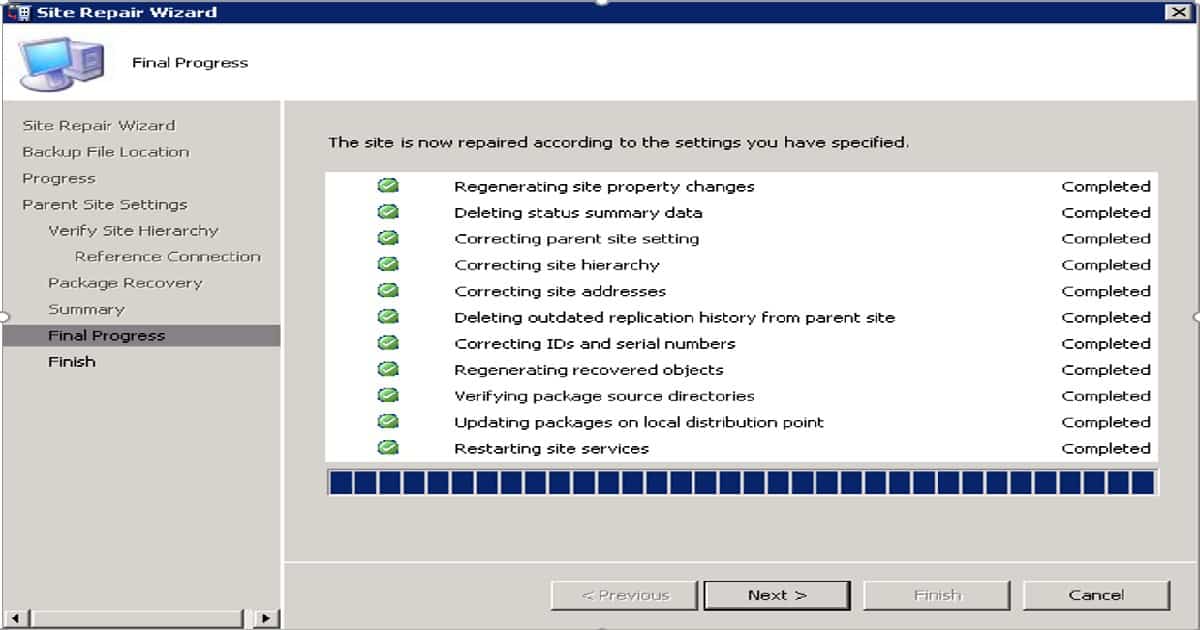
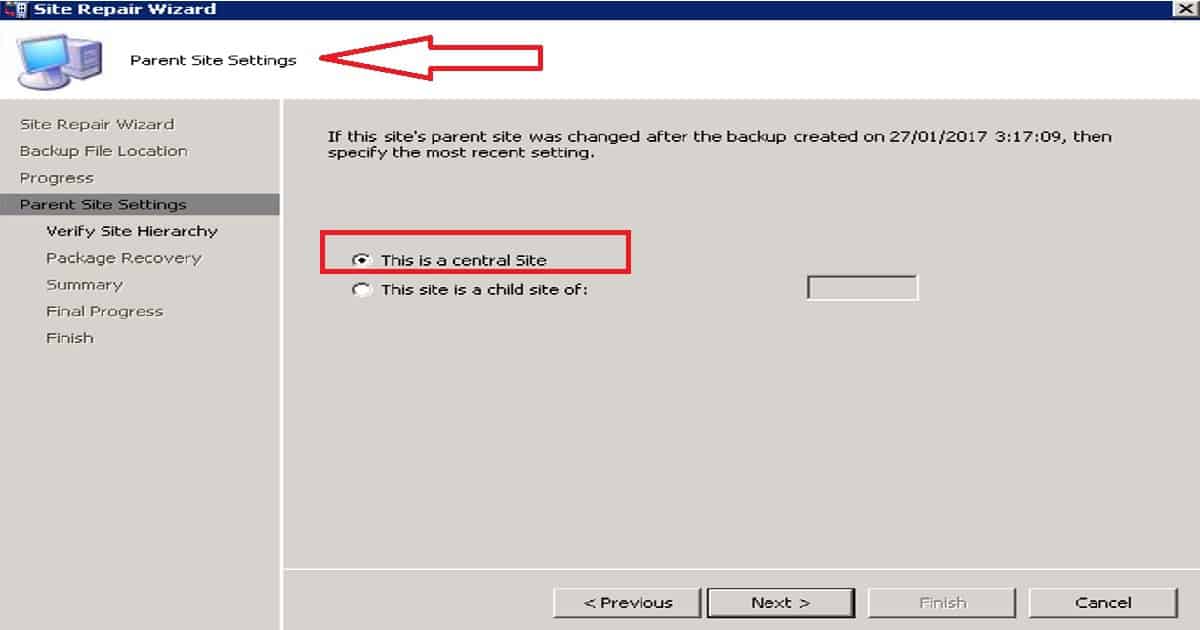
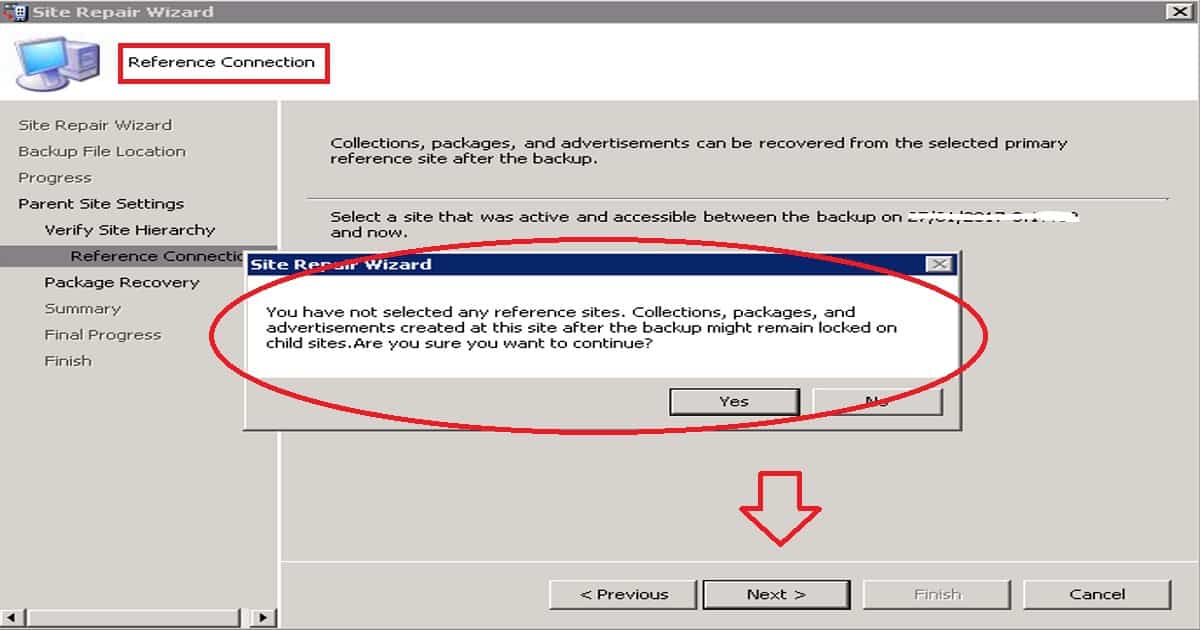
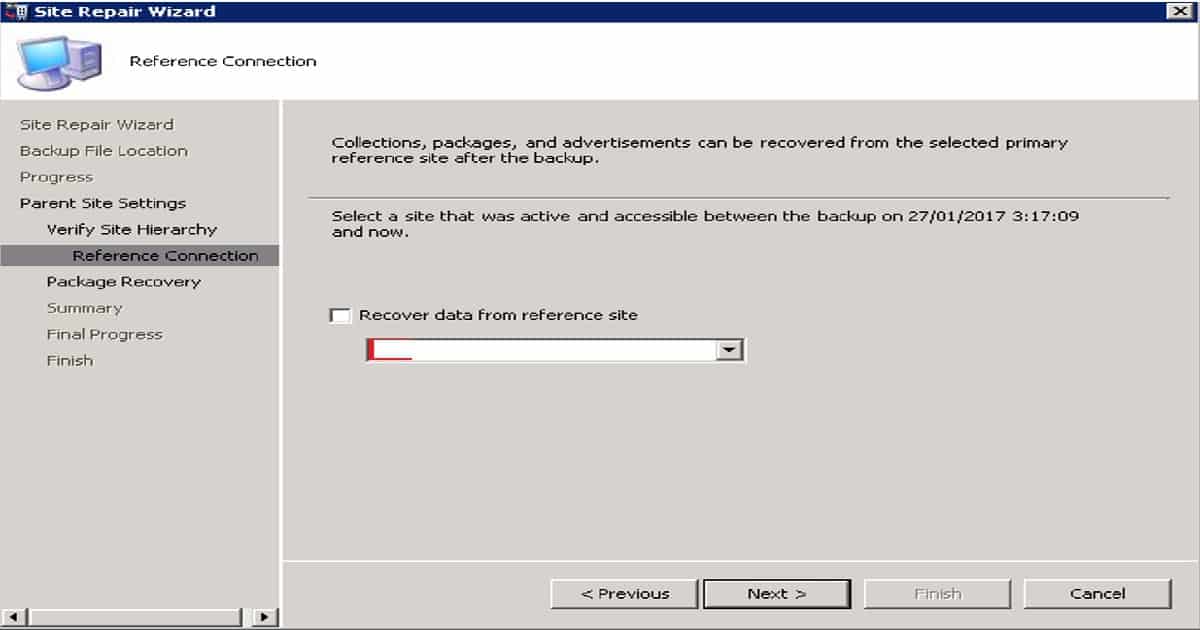
SCCM ConfigMgr Current Branch Backup Recovery Options | Configuration Manager | Endpoint Manager - Fig.1
SCCM ConfigMgr Current Branch Backup Recovery Options | Configuration Manager | Endpoint Manager – Fig.1

The following are the posts you can refer to for each scenario. I’m still planning to create the last couple of videos in this series, which will cover the backup and restore of the SCCM/ConfigMgr CB CAS server either from native SCCM backup or from SQL backup.

How to Plan Backup and Recovery for SCCM ConfigMgr CB

SCCM ConfigMgr Current Branch Backup Recovery Options | Configuration Manager | Endpoint Manager? More details in the following link https://www.anoopcnair.com/what-are-the-options-for-sccm-cb-1606-backup-and-recovery/

How to Restore or Recover SCCM ConfigMgr CB Standalone Primary Server

This video tutorial explains restoring or recovering an SCCM/ConfigMgr CB standalone primary server. Some prerequisites are needed to ensure a smooth and successful recovery of your SCCM/ConfigMgr CB standalone primary server. It helps maintain consistency and compatibility with your existing setup.

How to Recover SCCM CB Primary Server Using SQL Database Backup 

SCCM ConfigMgr Current Branch Backup Recovery Options | Configuration Manager | Endpoint Manager? The following Link will have more details – https://www.anoopcnair.com/how-to-recover-sccm-cb-primary-server-using-sql-database-backup/

More details in the following link https://www.anoopcnair.com/what-are-the-options-for-sccm-cb-1606-backup-and-recovery/

How to Recover SCCM CB Primary Server Using SQL Database Backup 

The following Link will have more details – https://www.anoopcnair.com/how-to-recover-sccm-cb-primary-server-using-sql-database-backup/
https://www.youtube.com/embed/4aZFSPI3x1I

We are on WhatsApp now. To get the latest step-by-step guides, news, and updates, Join our Channel. Click here. HTMD WhatsApp.

Author

Anoop C Nair is Microsoft MVP! He is a Device Management Admin with more than 20 years of experience (calculation done in 2021) in IT. He is a Blogger, Speaker, and Local User Group HTMD Community leader. His main focus is on Device Management technologies like SCCM 2012, Current Branch, and Intune. He writes about ConfigMgr, Windows 11, Windows 10, Azure AD, Microsoft Intune, Windows 365, AVD, etc.


SCCM Online Service Connection Point Details - 2 Options 6

SCCM Online Service Connection Point Details – 2 Options

Let’s discuss the SCCM Online Service Connection Point Details – 2 Options. Microsoft released a new SCCM Current Branch version, SCCM CB 1610. If you are running SCCM CB 1511, 1602, or 1606, you can directly upgrade to SCCM CB 1610. This post and video provide more details about SCCM ConfigMgr CB Updates in Console and Upgrade.

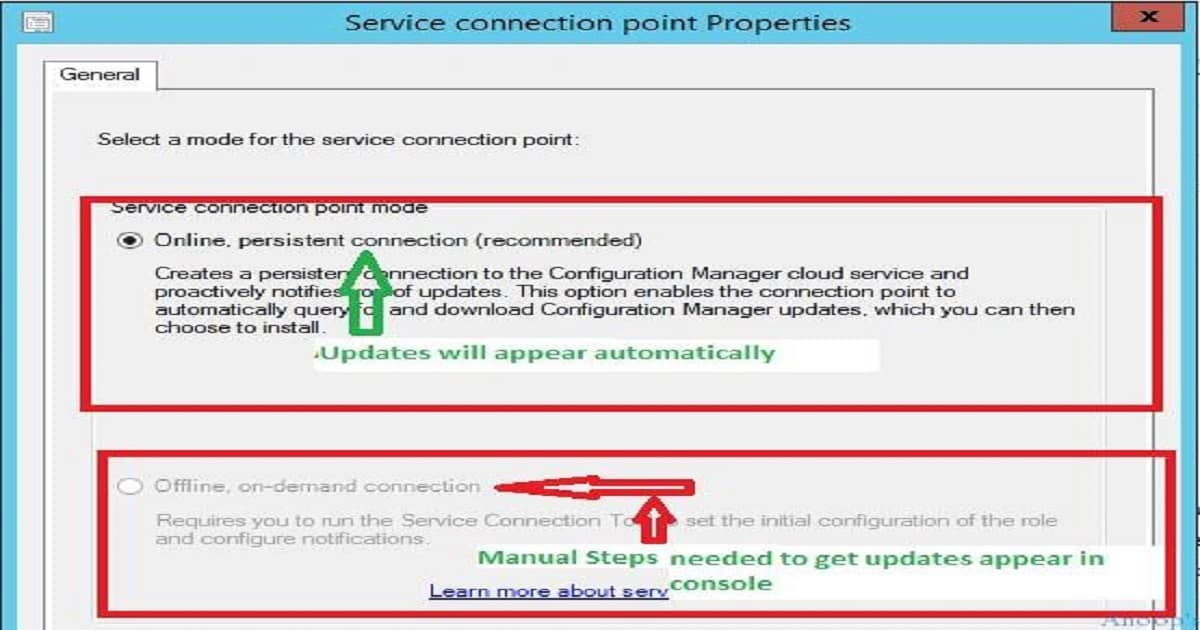
SCCM Upgrade Process The ConfigMgr CB upgrade process via updates and servicing channel is very straightforward if you have an ONLINE service connection point mode.

If you are running an offline service connection point mode, you must perform manual ways to get the latest SCCM CB 1610 updates available in your SCCM CB console.

This post provides all the details about the SCCM Online Service Connection Point Details—2 Options. For SCCM CB infra with an online service connection point, the SCCM CB 1610 update will automatically appear in the console once Microsoft has released this for “slow ring“.

SCCM Online Service Connection Point

Now (18th Nov 2016), Microsoft released SCCM CB 1610 updates only for the “fast ring,” which can be enabled only by running a PowerShell script provided in the following link.

Download_SCCM_ConfigMgr_1610_Updates
SCCM Online Service Connection Point Details – 2 Options – Fig.1

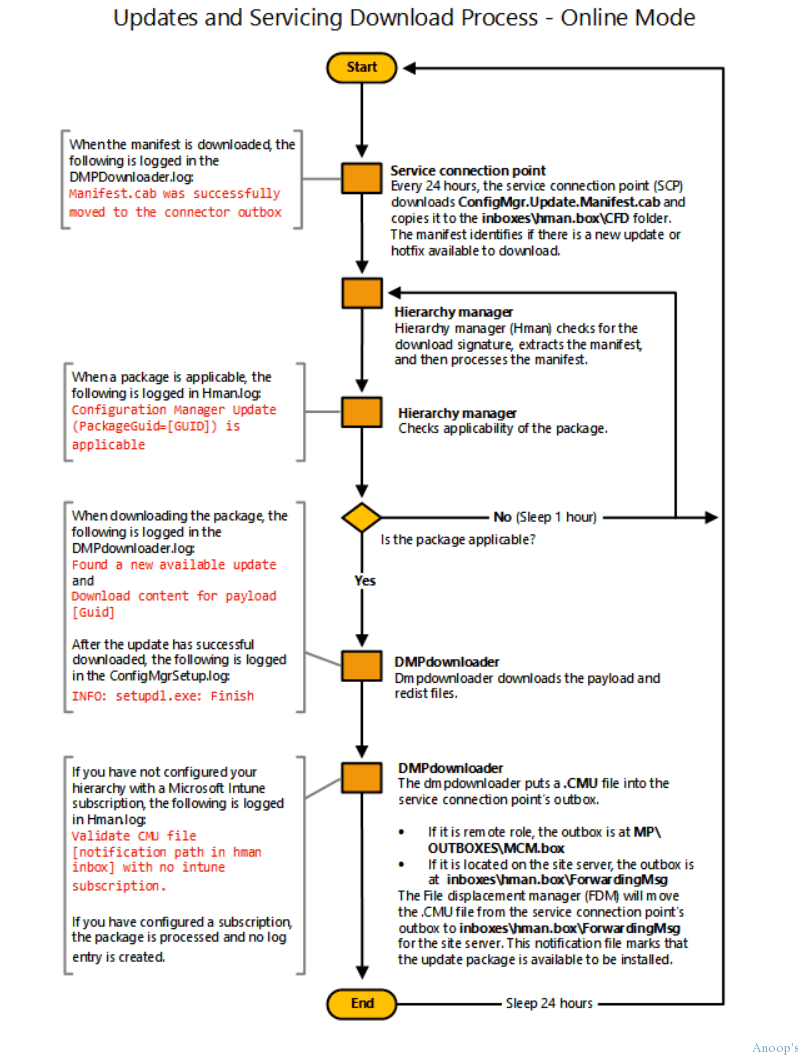
SCCM Servicing Flowchart 

Let’s discuss the SCCM Servicing Flowchart. The screenshot helps you show the updates and servicing download process. The flow chart documentation is here.

Updates and Servicing Download Process
Service Connection Point
Hierarchy Manager
The hierarchy Manager checks the applicability of the package
Is the package applicable?
DMP Downloader downloads the payload and redist files
The hierarchy Manager checks the applicability of the package
SCCM Online Service Connection Point Details – 2 Options – Table 1
SCCM Online Service Connection Point Details - 2 Options - Fig.2
SCCM Online Service Connection Point Details – 2 Options – Fig.2

How Did I Upgrade ConfigMgr SCCM CB 1602 to 1606

This is a 1-minute video that tells you how to start the SCCM CB 1610 upgrade process once the updates are available in the CM CB console. I have already covered the end-to-end SCCM CB upgrade process in a video here (even though that is about the CM 1606 upgrade, the process is similar).

SCCM Online Service Connection Point Details – 2 Options – Video 1

Start the Upgrade Process from the Console

I’m sharing the video tutorial about upgrading the SCCM ConfigMgr CB 1610 console. Before initiating the SCCM ConfigMgr CB console upgrade process, you must complete all the reset activities for site system roles (sitecomp.log gives you more ideas). Otherwise, there could be more chances of failures during the SCCM CB console upgrade.

SCCM Console Upgrade

Let’s discuss the SCCM Console Upgrade. The below section shows the SCCM Console Upgrade details.

We are on WhatsApp now. To get the latest step-by-step guides, news, and updates, Join our Channel. Click here. HTMD WhatsApp.

Author

Anoop C Nair is Microsoft MVP! He is a Device Management Admin with more than 20 years of experience (calculation done in 2021) in IT. He is a Blogger, Speaker, and Local User Group HTMD Community leader. His main focus is on Device Management technologies like SCCM 2012, Current Branch, and Intune. He writes about ConfigMgr, Windows 11, Windows 10, Azure AD, Microsoft Intune, Windows 365, AVD, etc.

Feature Comparison Between SCCM ConfigMgr CB Versions | Configuration Manager Current Branch 7

Feature Comparison Between SCCM ConfigMgr CB Versions | Configuration Manager Current Branch

Let’s discuss the Feature Comparison Between SCCM ConfigMgr CB Versions | Configuration Manager Current Branch. SCCM ConfigMgr’s current branch (CB) XXXX was released last Friday (18th Nov 2016).

SCCM CB YYYY has many features, and the upgrade process via updates and servicing channels is straightforward. You are done with the SCCM CB 1610 upgrade with just a couple of clicks.

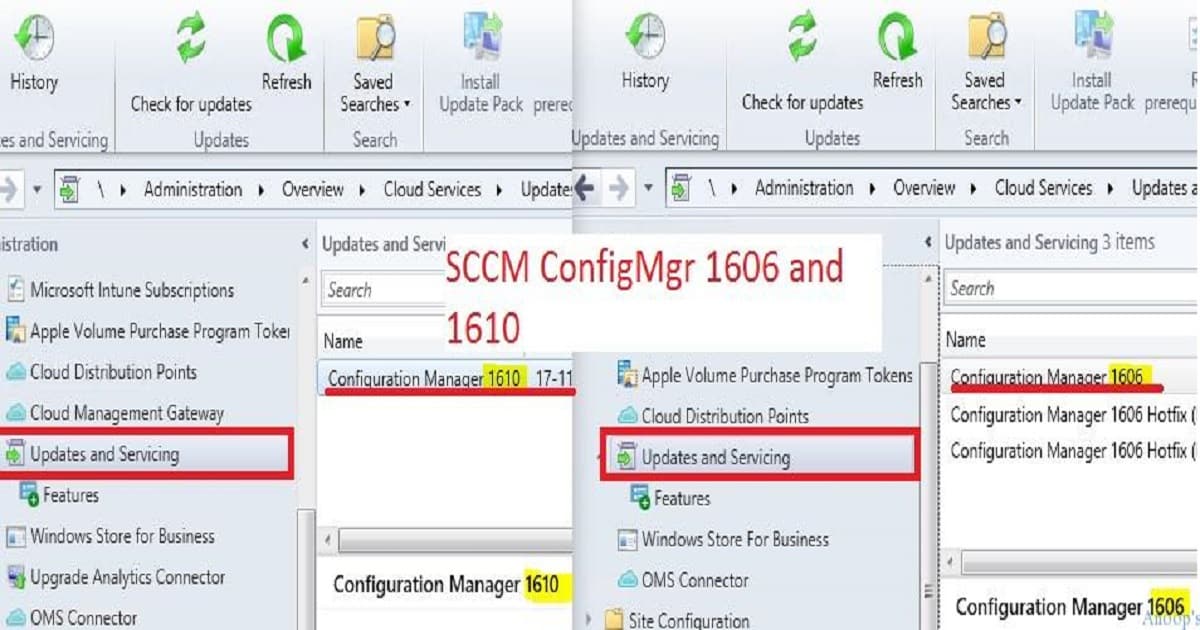
You can directly upgrade your SCCM CB 1511 server to 1610. You do not need to go through all the other upgrades (1602 /1606) available in your SCCM CB console. The blog post with more details is available here.

This post will share a comparison video of SCCM CB 1606 and 1610 features. The features discussed in the video below are essential for upcoming changes to SCCM ConfigMgr CB.

How Did I Upgrade ConfigMgr SCCM CB 1602 to 1606

The video tutorial below explains how I Upgraded ConfigMgr SCCM CB 1602 to 1606.

Feature Comparison Between SCCM ConfigMgr CB Versions | Configuration Manager Current Branch – Video 1

Feature Comparison Between SCCM ConfigMgr CB Versions

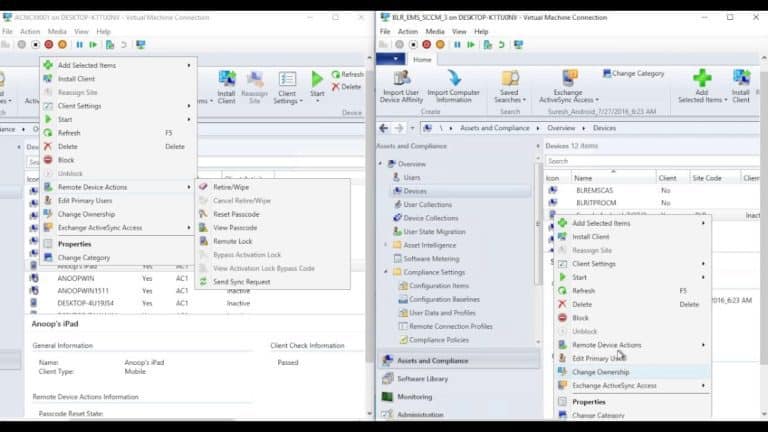
The configuration and compliance policy updates are critical if you use a hybrid SCCM CB version to manage mobile devices and domain-joined machines. I think the SCCM team invested loads of time in improving the features of their product.

Feature Comparison Between SCCM ConfigMgr CB Versions
SCCM ConfigMgr 1606 and 1610
Feature Comparison Between SCCM ConfigMgr CB Versions | Configuration Manager Current Branch – Table 1
Feature Comparison Between SCCM ConfigMgr CB Versions | Configuration Manager Current Branch - Fig.1
Feature Comparison Between SCCM ConfigMgr CB Versions | Configuration Manager Current Branch – Fig.1

Feature Comparison Between SCCM ConfigMgr CB Versions

SCCM CB is moving away from old-fashioned boundary-setting, such as fast and slow boundaries. Rather, investing more in current and neighbor boundary groups. This will help to evolve the product further in upcoming versions.

A version of SCCM 1610 feature comparison includes Boundary groups

  • current and neighbor boundary groups, Improvements on Windows Store for business,
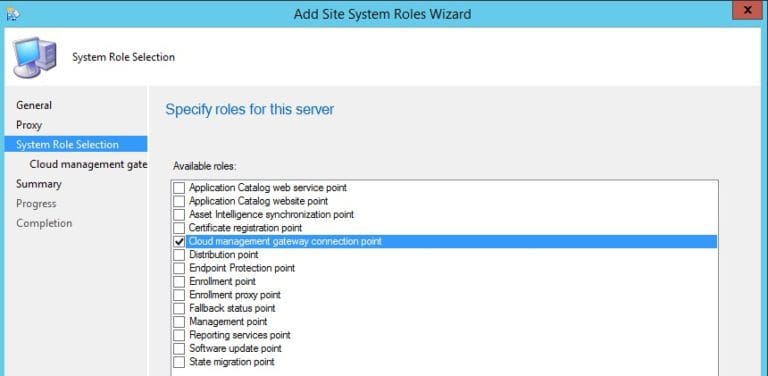
  • Cloud Management Gateway (internet client management),
  • Immediate Policy sync for Intune-enrolled devices,
  • Changes in Configuration and compliance policies,
  • Lookout integration with SCCM CB 1610,
  • Client Peer cache settings – client peer cache dashboard,
  • enforcement of grace period,
  • Content size filter in Software update ADR and monitoring of loads of components have been updated,
  • And new dashboards have been included.

List of Feature Comparison Between SCCM ConfigMgr CB Versions

New Features as part of SCCM CB 1610 updates and servicing. Boundary Changes – Improvements for boundary groups – current boundary group vs neighbor boundary groups.

  1. Improvements Windows Store for Business  – Modify the client secret key and delete a subscription to the store from the SCCM Console.
  2. Cloud management gateway for managing Internet-based clients – Cloud management gateway provides a simple way to manage Configuration Manager clients on the Internet.
  3. Immediate Policy sync for MDM channel Intune-enrolled devices.
  4. Configuration policies – New policies included in SCCM CB 1610 – Android (23), iOS (4), Mac (4), Windows 10 desktop and mobile (37), Windows 10 Team (7), Windows 8.1 (11), and Windows Phone 8.1 (3).
  5. Compliance Policies settings improvements -Lookout integration compliance Policies
  6. The Windows 10 Edition Upgrade Policy can be applied for SCCM CB 1610. It is now available for Intune and SCCM clients.
  7. Client Agent—Client Peer Cache helps you manage content deployment to clients in remote locations. Peer Cache is a built-in SCCM solution that allows clients to share content directly from their local cache. To share content, enable the Configuration Manager client in full OS. Yes.
  8. Customizable Branding is also included in the SCCM CB 1610.
  9. The enforcement grace period is an excellent feature of SCCM CB 1610.
  10. Another nice feature included in SCCM CB 1610 Software Update ADR is Content Size.
  11. Monitoring – Compliance policies Dashboard and Client Data Source Dashboard.

Resources

SCCM Dynamic Collection – Part 2 | WQL Query | ConfigMgr | Create HTMD Blog (anoopcnair.com)

Validate Azure AD Dynamic Group Rules | Intune

We are on WhatsApp now. To get the latest step-by-step guides, news, and updates, Join our Channel. Click here. HTMD WhatsApp.

Author

Anoop C Nair is Microsoft MVP! He is a Device Management Admin with more than 20 years of experience (calculation done in 2021) in IT. He is a Blogger, Speaker, and Local User Group HTMD Community leader. His main focus is on Device Management technologies like SCCM 2012, Current Branch, and Intune. He writes about ConfigMgr, Windows 11, Windows 10, Azure AD, Microsoft Intune, Windows 365, AVD, etc.
Are You Having Issue with Windows 10 WIP EDP SCCM CB Configuration Manager ConfigMgr 13

Are You Having Issue with Windows 10 WIP EDP SCCM CB Configuration Manager ConfigMgr

Are You Having an Issue with Windows 10 WIP EDP SCCM CB Configuration Manager ConfigMgr?

Are you having issues with Windows Information Protection (WIP, previously known as “Enterprise Data Protection – EDP” policies configured through the SCCM ConfigMgr CB 1606 production version?

If so, I was one of you. I’m talking about the issue I faced while deploying the WIP policy via the Windows 10 MDM channel. I will try to explain the problem which I had with WIP CI (for the specific scenario which I tested):-

When you open WIP CI, try to check whether everything is okay or not and exit out of CI with/without making any changes. Some values in CI XML will automatically change, breaking the entire CI.

Windows Information Protection WIP – Are You Having Issue with Windows 10 WIP EDP SCCM CB Configuration Manager ConfigMgr

I’ve embedded a video below explaining this bug/issue. If you are new to WIP/EDP and want to know how to create, deploy, and test WIP with Windows 10, look at my previous post and video here.

The good news is that Microsoft’s new rollup update (KB3186654) most probably fixed this issue. I have done extensive testing with Windows Information Protection (WIP) policies/CIs after installing the new rollup on the SCCM CB 1606 server, and the results are very promising.

NameType
New Windows 10 WIPGeneral
Are You Having Issue with Windows 10 WIP EDP SCCM CB Configuration Manager ConfigMgr – Table 1
Are You Having Issue with Windows 10 WIP EDP SCCM CB Configuration Manager ConfigMgr - Fig.1
Are You Having Issue with Windows 10 WIP EDP SCCM CB Configuration Manager ConfigMgr – Fig.1

How to Create – Deploy WIP EDP Using SCCM CB 1606 and End-user experience of WIP

I tried creating new WIP CIs, editing the existing WIP CIs, etc. All the scenarios I tested worked well for me. I tested this with Windows 10 1607 build numbers 14393.00 and 14393.82 (via MDM channel). Are You Having an Issue with Windows 10 WIP EDP SCCM CB Configuration Manager ConfigMgr Endpoint Protection?

Are You Having Issue with Windows 10 WIP EDP SCCM CB Configuration Manager ConfigMgr – Video 1

Sample of the correct WIP CI with correct ConstantValue

Let’s discuss the Sample of the correct WIP CI with the correct ConstantValue. The below section helps you show the sample of the correct WIP CI with the correct ConstantValue.

<Condition>                   <Expression>                     <Operator>NotEquals</Operator>                     <Operands>                       <SettingReference AuthoringScopeId="GLOBAL" LogicalName="EnterpriseDataProtection" DataType="String" SettingLogicalName="AllowedEXEHash" SettingSourceType="CIM" Method="Value" Changeable="false" />                       <ConstantValue Value="EB9D585A55FAEA4A913BBAB7101911F5BAEA7CA84A8D8AD6BBB7FB50363117F1" DataType="String" />                     </Operands>                   </Expression>                 </Condition>

Resources

Learn Microsoft Intune Related Posts Real World Experiences

SCCM Related Posts Real World Experiences Of SCCM Admins

Intune Device Management – HTMD Blog #2

We are on WhatsApp now. To get the latest step-by-step guides, news, and updates, Join our Channel. Click here. HTMD WhatsApp.

Author

Anoop C Nair is Microsoft MVP! He is a Device Management Admin with more than 20 years of experience (calculation done in 2021) in IT. He is a Blogger, Speaker, and Local User Group HTMD Community leader. His main focus is on Device Management technologies like SCCM 2012, Current Branch, and Intune. He writes about ConfigMgr, Windows 11, Windows 10, Azure AD, Microsoft Intune, Windows 365, AVD, etc.