
Key Takeaways
- Windows 11 uses a 4-part build format: Major.Minor.Build.Revision (Example: 10.0.26200.7840).
- Major version (10) remains the same for Windows 10 and Windows 11
- Minor version (0) typically does not change and reflects the internal OS architecture version.
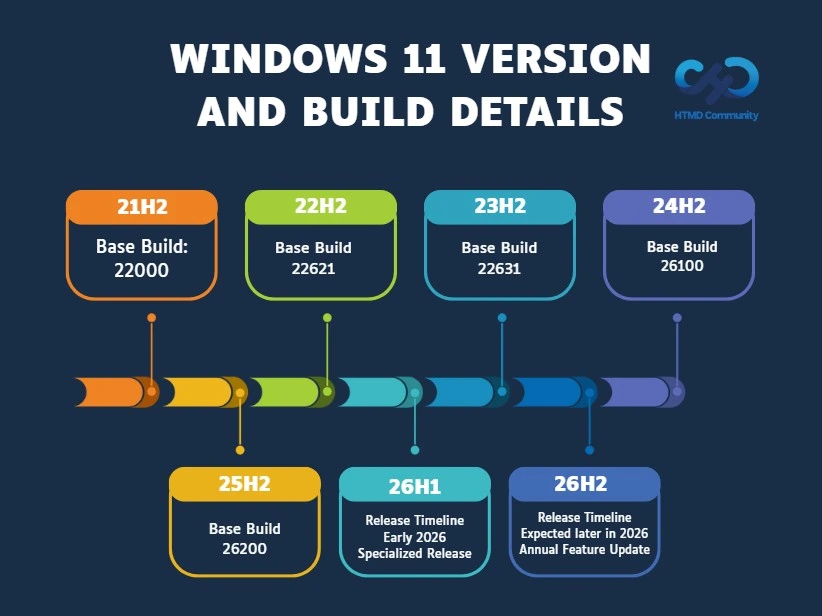
- The build number (for example, 22000, 22621, 22631, 26100, 26200) identifies the feature update version — 22000 corresponds to 21H2, 22621 to 22H2, 22631 to 23H2, 26100 to 24H2, and 26200 to 25H2.
- Revision number (e.g., .7840) increases with each monthly cumulative update (Patch Tuesday releases).
- Feature updates (like 24H2, 25H2) are released annually and introduce new features and platform changes.
- Cumulative updates (KB updates) are released monthly and improve security, stability, and performance without changing the feature version.
This post will try to keep the list up to date with the latest Windows 11 build numbers. The most recent major production release of Windows 11 is version 25H2 (build 10.0.26200.7840), updated through KB5077181 on 10th February 2026. Alongside 25H2, Windows 11 version 24H2 (build 10.0.26100.7840) and version 23H2 (build 10.0.22631.6649) also received cumulative updates on the same date. You can check out the following post for more details on Windows 11 end-of-life (EOL) dates and servicing timelines.
Table of Content
Table of Contents
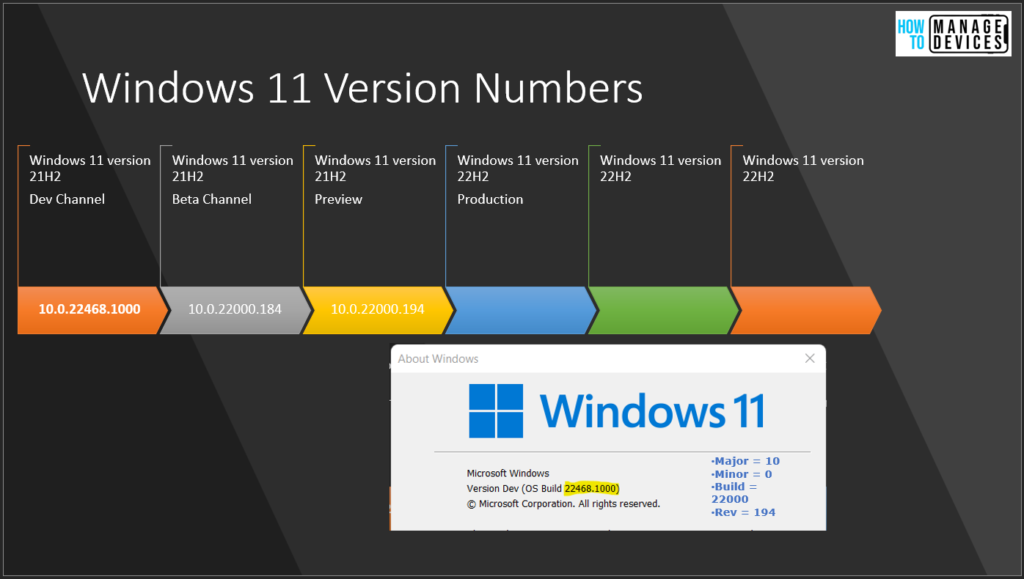
Windows 11 Version Numbers Build Numbers Major Minor Build Rev
Windows 11 follows an annual feature update model for production releases. The first version, Windows 11 21H2, was released in October 2021, followed by 22H2 in 2022, 23H2 in 2023, 24H2 in 2024, and the latest production release, 25H2 in 2025. Each feature update introduces a new build branch while continuing to receive monthly cumulative updates for security and quality improvements.
Windows 11 Versions Decoded – Video
This video explains the structure of Windows Versions Major Minor Build Rev details and discusses the possibilities of Windows 12 build versions.
- Computer\HKEY_LOCAL_MACHINE\SOFTWARE\Microsoft\Windows NT\CurrentVersion\CurrentBuildNumber
CurrentMajorVersionNumber = 10 CurrentMinorVersionNumber = 0 CurrentBuildNumber = 25947 UBR = 1000 (aka Rev).

- Microsoft Confirms April 2026 Update Causes LSASS Crashes And Domain Controller Reboot Loops
- 2026 March KB5079473 KB5078883 Windows 11 Patch | 2 Zero Day Vulnerabilities And 79 Flaws
- Easily Upgrade To Windows Server 2025 Using Windows Update Without Losing Settings Roles Features And Data
- How To Create Windows 11 Bootable USB Drive From ISO
- SCCM Logs Files List Of ConfigMgr Logs Files MEMCM Logs (anoopcnair.com)
- How to Check Your Windows 11 Edition
- Easy Methods to Know the Version of Installed Apps in Windows 11
- Windows 10 Version Numbers Build Numbers Major Minor Build Rev
Major Minor Build Rev Details
Let’s examine Windows 11, including major and minor, build, and rev, in more detail. The table below provides details on these versions.
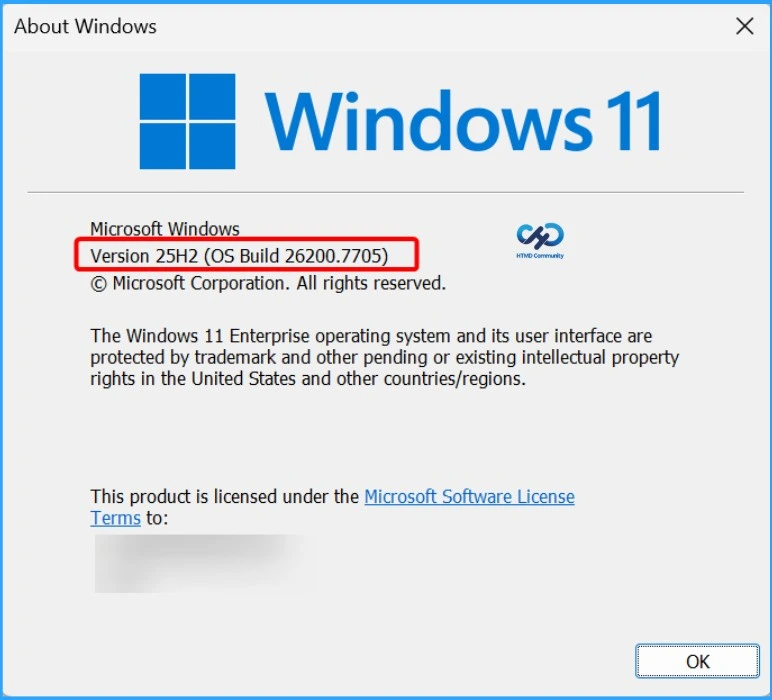
In the below table, I have taken an example of the latest Windows 11 production build number 10.0.26200.7840.
| Name | Version |
|---|---|
| Major | 10 |
| Minor | 0 |
| Build | 26200 |
| Rev | 7840 |
Windows 11 Version Numbers and Build Details
Windows 11 follows an annual feature update model, where each version is identified by a unique base build number. The base build represents the feature update branch, while the full build number follows the Major.Minor.Build.Revision format (for example, 10.0.22621.xxxx).
Versions Numbers Build Versions – Production Release
The following table gives the Windows 11 version numbers and build version details for the production release. There is only one production release of Windows 11 per year, unlike Windows 10. Microsoft uses the same format for Windows 11 production releases as well.
Windows 11 Versions – Production Release Build and Servicing Details
Microsoft releases annual feature updates for Windows 11, and each version continues to receive monthly cumulative updates (KB releases). The table below summarises the latest production build versions, their associated KB updates, availability dates, and servicing timelines. Staying on a supported version ensures continued security updates and compliance.
| Windows 11 Versions – Production Release Build Version | Windows 11 Build version | KB | Availability Date | Start of Servicing Date | End of Servicing Date |
|---|---|---|---|---|---|
| Windows 11 26H1 – 10.0.28000.2704 | 10.0.28000.2704 | KB5121000 | Aug 11, 2026 | 10th March 2026 | 10th Nov 2026 |
| Windows 11 25H2 – 10.0.26200.9168 | 10.0.26200.9168 | KB5121003 | Aug 11, 2026 | 9th October 2025 | 10th October 2028 |
| Windows 11 24H2 – 10.0.26100.9168 | 10.0.26100.9168 | KB5121003 | Aug 11, 2026 | 1st Oct 2024 | 12th Oct 2027 |
| Windows 11 23H2 – 10.0.22631.7517 | 10.0.22631.7517 | KB5120240 | Aug 11, 2026 | 31st Oct 2023 | 10th Nov 2026 |
| Windows 11 26H1 – 10.0.28000.2525 | 10.0.28000.2525 | KB5101649 | July 14, 2026 | 10th March 2026 | 10th Nov 2026 |
| Windows 11 25H2 – 10.0.26200.8875 | 10.0.26200.8875 | KB5101650 | July 14, 2026 | 9th October 2025 | 10th October 2028 |
| Windows 11 24H2 – 10.0.26100.8875 | 10.0.26100.8875 | KB5101650 | July 14, 2026 | 1st Oct 2024 | 12th Oct 2027 |
| Windows 11 23H2 – 10.0.22631.7376 | 10.0.22631.7376 | KB5099414 | July 14, 2026 | 31st Oct 2023 | 10th Nov 2026 |
| Windows 11 26H1 – 10.0.28000.2269 | 10.0.28000.2269 | KB5095051 | June 9, 2026 | 10th March 2026 | 10th Nov 2026 |
| Windows 11 25H2 – 10.0.26200.8655 | 10.0.26200.8655 | KB5094126 | June 9, 2026 | 9th October 2025 | 10th October 2028 |
| Windows 11 24H2 – 10.0.26100.8655 | 10.0.26100.8655 | KB5094126 | June 9, 2026 | 1st Oct 2024 | 12th Oct 2027 |
| Windows 11 23H2 – 10.0.22631.7219 | 10.0.22631.7219 | KB5093998 | June 9, 2026 | 31st Oct 2023 | 10th Nov 2026 |
| Windows 11 26H1 – 10.0.28000.2113 | 10.0.28000.2113 | KB5089548 | May 12, 2026 | 10th March 2026 | – |
| Windows 11 25H2 – 10.0.26200.8457 | 10.0.26200.8457 | KB5089549 | May 12, 2026 | 9th October 2025 | 10th October 2028 |
| Windows 11 24H2 – 10.0.26100.8457 | 10.0.26100.8457 | KB5089549 | May 12, 2026 | 1st Oct 2024 | 12th Oct 2027 |
| Windows 11 23H2 – 10.0.22631.7079 | 10.0.22631.7079 | KB5087420 | May 12, 2026 | 31st Oct 2023 | 10th Nov 2026 |
| Windows 11 26H1 – 10.0.28000.1836 | 10.0.28000.1836 | KB5083768 | 14th April 2026 | 10th March 2026 | – |
| Windows 11 25H2 – 10.0.26200.8246 | 10.0.26200.8246 | KB5083769 | 14th April 2026 | 9th October 2025 | 10th October 2028 |
| Windows 11 24H2 – 10.0.26100.8246 | 10.0.26100.8246 | KB5083769 | 14th April 2026 | 1st Oct 2024 | 12th Oct 2027 |
| Windows 11 23H2 – 10.0.22631.6936 | 10.0.22631.6936 | KB5082052 | 14th April 2026 | 31st Oct 2023 | 10th Nov 2026 |
| Windows 11 26H1 – 10.0.28000.1719 | 10.0.28000.1719 | KB5079466 | 10th March 2026 | 10th March 2026 | |
| Windows 11 25H2 – 10.0.26200.8037 | 10.0.26200.8037 | KB5079473 | 10th March 2026 | 9th October 2025 | 10th October 2028 |
| Windows 11 24H2 – 10.0.26100.8037 | 10.0.26100.8037 | KB5079473 | 10th March 2026 | 1st Oct 2024 | 12th Oct 2027 |
| Windows 11 23H2 – 10.0.22631.6783 | 10.0.22631.6783 | KB5078883 | 10th March 2026 | 31st Oct 2023 | 10th Nov 2026 |
| Windows 11 26H2 > Platform-specific branch >Not offered to existing PCs via upgrade | Early 2026 | ||||
| Windows 11 26H1 >Standard annual servicing channel >Available to existing supported PCs | Expected later in 2026 | ||||
| Windows 11 25H2 – 10.0.26200.7840 | 10.0.26200.7840 | KB5077181 | 10th February 2026 | 9th October 2025 | 10th October 2028 |
| Windows 11 24H2 – 10.0.26100.7840 | 10.0.26100.7840 | KB5077181 | 10th February 2026 | 1st Oct 2024 | 12th Oct 2027 |
| Windows 11 23H2 – 10.0.22631.6649 | 10.0.22631.6649 | KB5075941 | 10th February 2026 | 31st Oct 2023 | 10th Nov 2026 |
| Windows 11 25H2 – 10.0.26200.7623 | 10.0.26200.7623 | KB5074109 | 12th January 2026 | 9th October 2025 | 10th October 2028 |
| Windows 11 24H2 – 10.0.26100.7623 | 10.0.26100.7623 | KB5074109 | 12th January 2026 | 1st Oct 2024 | 12th Oct 2027 |
| Windows 11 23H2 – 10.0.22631.6491 | 10.0.22631.6491 | KB5073455 | 12th January 2026 | 31st Oct 2023 | 10th Nov 2026 |
| Windows 11 25H2 – 10.0.26200.7462 | 10.0.26200.7462 | KB5072033 | 9th December 2025 | 9th October 2025 | 10th October 2028 |
| Windows 11 24H2 – 10.0.26100.7462 | 10.0.26100.7462 | KB5072033 | 9th December 2025 | 1st Oct 2024 | 12th Oct 2027 |
| Windows 11 23H2 – 10.0.22631.6345 | 10.0.22631.6345 | KB5072033 | 9th December 2025 | 31st Oct 2023 | 10th Nov 2026 |
| Windows 11 25H2 – 10.0.26200.7171 | 10.0.26200.7171 | KB5068861 | 11th November 2025 | 9th October 2025 | 10th October 2028 |
| Windows 11 24H2 – 10.0.26100.7171 | 10.0.26100.7171 | KB5068861 | 11th November 2025 | 1st Oct 2024 | 12th Oct 2027 |
| Windows 11 23H2 – 10.0.22631.6199 | 10.0.22631.6199 | KB5068861 | 11th November 2025 | 31st Oct 2023 | 10th Nov 2026 |
| Windows 11 25H2 – 10.0.26200.6899 | 10.0.26200.6899 | KB5066835 | 10th October 2025 | 9th October 2025 | 10th October 2028 |
| Windows 11 24H2 – 10.0.26100.6899 | 10.0.26100.6899 | KB5066835 | 10th October 2025 | 1st Oct 2024 | 12th Oct 2027 |
| Windows 11 23H2 – 10.0.22631.6060 | 10.0.22631.6060 | KB5066793 | 10th October 2025 | 31st Oct 2023 | 10th Nov 2026 |
| Windows 11 22H2 – 10.0.22621.6060 | 10.0.22621.6060 | KB5066793 | 10th October 2025 | 20th Sep 2022 | 14th Oct 2025 |
| Windows 11 24H2 – 10.0.26100.6584 | 10.0.26100.6584 | KB5065426 | 9th September 2025 | 1st Oct 2024 | 12th Oct 2027 |
| Windows 11 23H2 – 10.0.22631.5909 | 10.0.22631.5909 | KB5065431 | 9th September 2025 | 31st Oct 2023 | 10th Nov 2026 |
| Windows 11 22H2 – 10.0.22621.5909 | 10.0.22621.5909 | KB5065431 | 9th September 2025 | 20th Sep 2022 | 14th Oct 2025 |
| Windows 11 24H2 – 10.0.26100.4946 | 10.0.26100.4946 | KB5063878 | 12th Aug 2025 | 1st Oct 2024 | 12th Oct 2027 |
| Windows 11 23H2 – 10.0.22631.5768 | 10.0.22631.5768 | KB5063875 | 12th Aug 2025 | 31st Oct 2023 | 10th Nov 2026 |
| Windows 11 22H2 – 10.0.22621.5768 | 10.0.22621.5768 | KB5063875 | 12th Aug 2025 | 20th Sep 2022 | 14th Oct 2025 |
| Windows 11 24H2 – 10.0.26100.4652 | 10.0.26100.4652 | KB5062553 | 8th July 2025 | 1st Oct 2024 | 12th Oct 2027 |
| Windows 11 23H2 – 10.0.22631.5624 | 10.0.22631.5624 | KB5062552 | 8th July 2025 | 31st Oct 2023 | 10th Nov 2026 |
| Windows 11 22H2 – 10.0.22621.5624 | 10.0.22621.5624 | KB5062552 | 8th July 2025 | 20th Sep 2022 | 14th Oct 2025 |
| Windows 11 24H2 – 10.0.26100.4343 | 10.0.26100.4343 | KB5060842 | 10th June 2025 | 1st Oct 2024 | 12th Oct 2027 |
| Windows 11 23H2 – 10.0.22631.5472 | 10.0.22631.5472 | KB5060999 | 10th June 2025 | 31st Oct 2023 | 10th Nov 2026 |
| Windows 11 22H2 – 10.0.22621.5472 | 10.0.22621.5472 | KB5060999 | 10th June 2025 | 20th Sep 2022 | 14th Oct 2025 |
| Windows 11 24H2 – 10.0.26100.4061 | 10.0.26100.4061 | KB5058411 | 13th May 2025 | 1st Oct 2024 | 12th Oct 2027 |
| Windows 11 23H2 – 10.0.22631.5335 | 10.0.22631.5335 | KB5058405 | 13th May 2025 | 31st Oct 2023 | 10th Nov 2026 |
| Windows 11 22H2 – 10.0.22621.5335 | 10.0.22621.5335 | KB5058405 | 13th May 2025 | 20th Sep 2022 | 14th Oct 2025 |
| Windows 11 24H2 – 10.0.26100.3775 | 10.0.26100.3775 | KB5055523 | 8th April 2025 | 1st Oct 2024 | 12th Oct 2027 |
| Windows 11 23H2 – 10.0.22631.5189 | 10.0.22631.5189 | KB5055528 | 8th April 2025 | 31st Oct 2023 | 10th Nov 2026 |
| Windows 11 22H2 – 10.0.22621.5189 | 10.0.22621.5189 | KB5055528 | 8th April 2025 | 20th Sep 2022 | 14th Oct 2025 |
| Windows 11 24H2 – 10.0.26100.3476 | 10.0.26100.3476 | KB5053598 | 11th March 2025 | 1st Oct 2024 | 12th Oct 2027 |
| Windows 11 23H2 – 10.0.22631.5039 | 10.0.22631.5039 | KB5053602 | 11th March 2025 | 31st Oct 2023 | 10th Nov 2026 |
| Windows 11 22H2 – 10.0.22621.5039 | 10.0.22621.5039 | KB5053602 | 11th March 2025 | 20th Sep 2022 | 14th Oct 2025 |
| Windows 11 24H2 – 10.0.26100.3194 | 10.0.26100.3194 | KB5051987 | 11th Feb 2025 | 1st Oct 2024 | 12th Oct 2027 |
| Windows 11 23H2 – 10.0.22631.4890 | 10.0.22631.4890 | KB5051989 | 11th Feb 2025 | 31st Oct 2023 | 10th Nov 2026 |
| Windows 11 22H2 – 10.0.22621.4890 | 10.0.22621.4890 | KB5051989 | 11th Feb 2025 | 20th Sep 2022 | 14th Oct 2025 |
| Windows 11 24H2 – 10.0.26100.2894 | 10.0.26100.2894 | KB5050009 | 14th Jan 2025 | 1st Oct 2024 | 12th Oct 2027 |
| Windows 11 23H2 – 10.0.22631.4751 | 10.0.22631.4751 | KB5050021 | 14th Jan 2025 | 31st Oct 2023 | 10th Nov 2026 |
| Windows 11 22H2 – 10.0.22621.4751 | 10.0.22621.4751 | KB5050021 | 14th Jan 2025 | 20th Sep 2022 | 14th Oct 2025 |
| Windows 11 24H2 – 10.0.26100.2605 | 10.0.26100.2605 | KB5048667 | 10th Dec 2024 | 1st Oct 2024 | 12th Oct 2027 |
| Windows 11 23H2 – 10.0.22631.4602 | 10.0.22631.4602 | KB5048685 | 10th Dec 2024 | 31st Oct 2023 | 10th Nov 2026 |
| Windows 11 22H2 – 10.0.22621.4602 | 10.0.22621.4602 | KB5048685 | 10th Dec 2024 | 20th Sep 2022 | 14th Oct 2025 |
| Windows 11 24H2 – 10.0.26100.2314 | 10.0.26100.2314 | KB5046617 | 12th Nov 2024 | 1st Oct 2024 | 12th Oct 2027 |
| Windows 11 23H2 – 10.0.22631.4460 | 10.0.22631.4460 | KB5046617 | 12th Nov 2024 | 31st Oct 2023 | 10th Nov 2026 |
| Windows 11 22H2 – 10.0.22621.4460 | 10.0.22621.4460 | KB5046617 | 12th Nov 2024 | 20th Sep 2022 | 14th Oct 2025 |
| Windows 11 24H2 – 10.0.26100.2033 | 10.0.26100.2033 | KB5044284 | 8th October 2024 | 1st Oct 2024 | 12th Oct 2027 |
| Windows 11 23H2 – 10.0.22631.4169 | 10.0.22631.4169 | KB5044285 | 8th October 2024 | 31st Oct 2023 | 10th Nov 2026 |
| Windows 11 22H2 – 10.0.22621.4317 | 10.0.22621.4317 | KB5044285 | 8th October 2024 | 20th Sep 2022 | 14th Oct 2025 |
| Windows 11 21H2 – 10.0.22000.3260 | 10.0.22000.3260 | KB5044280 | 8th October 2024 | 4th Oct 2021 | 8th Oct 2024 |
| Windows 11 23H2 – 10.0.22631.4169 | 10.0.22631.4169 | KB5043076 | 10th September 2024 | 31st Oct 2023 | 10th Nov 2026 |
| Windows 11 22H2 – 10.0.22621.4169 | 10.0.22621.4169 | KB5043076 | 10th September 2024 | 20th Sep 2022 | 14th Oct 2025 |
| Windows 11 21H2 – 10.0.22000.3197 | 10.0.22000.3197 | KB5043067 | 10th September 2024 | 4th Oct 2021 | 8th Oct 2024 |
| Windows 11 23H2 – 10.0.22631.4037 | 10.0.22631.4037 | KB5041585 | 13th August 2024 | 31st Oct 2023 | 10th Nov 2026 |
| Windows 11 22H2 – 10.0.22621.4037 | 10.0.22621.4037 | KB5041585 | 13th August 2024 | 20th Sep 2022 | 14th Oct 2025 |
| Windows 11 21H2 – 10.0.22000.3147 | 10.0.22000.3147 | KB5041592 | 13th August 2024 | 4th Oct 2021 | 8th Oct 2024 |
| Windows 11 23H2 – 10.0.22631.3880 | 10.0.22631.3880 | KB5040442 | 9th July 2024 | 31st Oct 2023 | 10th Nov 2026 |
| Windows 11 22H2 – 10.0.22621.3880 | 10.0.22621.3880 | KB5040442 | 9th July 2024 | 20th Sep 2022 | 14th Oct 2025 |
| Windows 11 21H2 – 10.0.22000.3079 | 10.0.22000.3079 | KB5040431 | 9th July 2024 | 4th Oct 2021 | 8th Oct 2024 |
| Windows 11 23H2 – 10.0.22631.3737 | 10.0.22631.3737 | KB5039212 | 11th June 2024 | 31st Oct 2023 | 10th Nov 2026 |
| Windows 11 22H2 – 10.0.22621.3737 | 10.0.22621.3737 | KB5039212 | 11th June 2024 | 20th Sep 2022 | 14th Oct 2025 |
| Windows 11 21H2 – 10.0.22000.3019 | 10.0.22000.3019 | KB5039213 | 11th June 2024 | 4th Oct 2021 | 8th Oct 2024 |
| Windows 11 23H2 – 10.0.22631.3593 | 10.0.22631.3593 | KB5037771 | 14th May 2024 | 31st Oct 2023 | 10th Nov 2026 |
| Windows 11 22H2 – 10.0.22621.3593 | 10.0.22621.3593 | KB5037771 | 14th May 2024 | 20th Sep 2022 | 14th Oct 2025 |
| Windows 11 21H2 – 10.0.22000.2960 | 10.0.22000.2960 | KB5037770 | 14th May 2024 | 4th Oct 2021 | 8th Oct 2024 |
| Windows 11 23H2 – 10.0.22631.3447 | 10.0.22631.3447 | KB5036893 | 9th April 2024 | 31st Oct 2023 | 10th Nov 2026 |
| Windows 11 22H2 – 10.0.22621.3447 | 10.0.22621.3447 | KB5036893 | 9th April 2024 | 20th Sep 2022 | 14th Oct 2025 |
| Windows 11 21H2 – 10.0.22000.2899 | 10.0.22000.2899 | KB5036894 | 9th April 2024 | 4th Oct 2021 | 8th Oct 2024 |
| Windows 11 23H2 – 10.0.22631.3296 | 10.0.22631.3296 | KB5035853 | 12th March 2024 | 31st Oct 2023 | 10th Nov 2026 |
| Windows 11 22H2 – 10.0.22621.3296 | 10.0.22621.3296 | KB5035853 | 12th March 2024 | 20th Sep 2022 | 14th Oct 2025 |
| Windows 11 21H2 – 10.0.22000.2836 | 10.0.22000.2836 | KB5035854 | 12th March 2024 | 4th Oct 2021 | 8th Oct 2024 |
| Windows 11 23H2 – 10.0.22631.3155 | 10.0.22631.3155 | KB5034765 | 13th Feb 2024 | 31st Oct 2023 | 10th Nov 2026 |
| Windows 11 22H2 – 10.0.22621.3155 | 10.0.22621.3155 | KB5034765 | 13th Feb 2024 | 20th Sep 2022 | 14th Oct 2025 |
| Windows 11 21H2 – 10.0.22000.2777 | 10.0.22000.2777 | KB5034766 | 13th Feb 2024 | 4th Oct 2021 | 8th Oct 2024 |
| Windows 11 23H2 – 10.0.22631.3007 | 10.0.22631.3007 | KB5034123 | 9th January 2024 | 31st Oct 2023 | 10th Nov 2026 |
| Windows 11 22H2 – 10.0.22621.3007 | 10.0.22621.3007 | KB5034123 | 9th January 2024 | 20th Sep 2022 | 14th Oct 2025 |
| Windows 11 21H2– 10.0.22000.2713 | 10.0.22000.2713 | KB5034121 | 9th January 2024 | 4th Oct 2021 | 8th Oct 2024 |
| Windows 11 23H2 – 10.0.22631.2861 | 10.0.22631.2861 | KB5033375 | 12th December 2023 | 31st Oct 2023 | 10th Nov 2026 |
| Windows 11 22H2 – 10.0.22621.2861 | 10.0.22621.3007 | KB5033375 | 12th December 2023 | 20th Sep 2022 | 14th Oct 2025 |
| Windows 11 21H2– 10.0.22000.2652 | 10.0.22000.2652 | KB5033369 | 12th December 2023 | 4th Oct 2021 | 8th Oct 2024 |
| Windows 11 23H2 – 10.0.22631.2715 – November 2023 | 10.0.22631.2715 | KB5032190 | 14th November 2023 | 31st Oct 2023 | 10th Nov 2026 |
| Windows 11 22H2 – 10.0.22621.2715 – November 2023 | 10.0.22621.2715 | KB5032190 | 14th November 2023 | 20th Sep 2022 | 14th Oct 2025 |
| Windows 11 21H2– 10.0.22000.2600 – November 2023 | 10.0.22000.2600 | KB5032192 | 14th November 2023 | 4th Oct 2021 | 8th Oct 2024 |
| Windows 11 22H2 – 10.0.22621.2428 – October 2023 | 10.0.22621.2428 | KB5031354 | 10th October 2023 | ||
| Windows 11 21H2– 10.0.22000.2538 – October 2023 | 10.0.22000.2538 | KB5031358 | 10th October 2023 | ||
| Windows 11 22H2 – 10.0.22621.2283 – September 2023 | 10.0.22621.2283 | KB5030219 | 12th September 2023 | ||
| Windows 11 21H2– 10.0.22000.2416 – September 2023 | 10.0.22000.2416 | KB5030217 | 12th September 2023 | ||
| Windows 11 22H2 – 10.0.22621.2134 – August 2023 | 10.0.22621.2134 | KB5029263 | 8th August 2023 | ||
| Windows 11 21H2– 10.0.22000.2295 – August 2023 | 10.0.22000.2295 | KB5029253 | 8th August 2023 | ||
| Windows 11 22H2 – 10.0.22621.1992 – July 2023 | 10.0.22621.1992 | KB5028185 | 11th July 2023 | ||
| Windows 11 21H2–10.0.22000.2176 – July 2023 | 10.0.22000.2176 | KB5028182 | 11th July 2023 | ||
| Windows 11 22H2 – 10.0.22621.1848 – June 2023 | 10.0.22621.1848 | KB5027231 | 13th June 2023 | ||
| Windows 11 21H2–10.0.22000.2057 – June 2023 | 10.0.22000.2057 | KB5027223 | 13th June 2023 | ||
| Windows 11 22H2 – 10.0.22621.1702 – May 2023 | 10.0.22621.1702 | KB5026372 | 9th May 2023 | ||
| Windows 11 21H2–10.0.22000.1936 – May 2023 | 10.0.22000.1936 | KB5026368 | 9th May 2023 | ||
| Windows 11 22H2 – 10.0.22621.1555 – April 2023 | 10.0.22621.1555 | KB5025239 | 11th April 2023 | ||
| Windows 11 21H2 –10.0.22000.1817 – April 2023 | 10.0.22000.1817 | KB5025224 | 11th April 2023 | ||
| Windows 11 22H2 (Production Release) – 10.0.22621.1413 – March 2023 | 10.0.22621.1413 | KB5023706 | 14th March 2023 | ||
| Windows 11 21H2 (Production Release)–10.0.22000.1696 – March 2023 | 10.0.22000.1696 | KB5023698 | 14th March 2023 | ||
| Windows 11 22H2 (Production Release) – 10.0.22621.1265 – Feb 2023 | 10.0.22621.1265 | KB5022845 | 14th Feb 2023 | ||
| Windows 11 21H2 (Production Release)– 10.0.22000.1574 – Feb 2023 | 10.0.22000.1574 | KB5022836 | 14th Feb 2023 | ||
| Windows 11 22H2 (Production Release) – 10.0.22621.1105 – Jan 2023 | 10.0.22621.1105 | KB5022303 | 10th Jan 2023 | ||
| Windows 11 21H2 (Production Release) –10.0.22000.1455 – Jan 2023 | 10.0.22000.1455 | KB5022287 | 10th Jan 2023 | ||
| Windows 11 22H2 (Production Release) – 10.0.22621.963 – Dec 2022 | 10.0.22621.963 | KB5021255 | 13th Dec 2022 | ||
| Windows 11 21H2 (Production Release)–10.0.22000.1335– Dec 2022 | 10.0.22000.1335 | KB5021234 | 13th Dec 2022 | ||
| Windows 11 22H2 (Production Release) – 10.0.22621.819 – Nov 2022 | 10.0.22621.819 | KB5019980 | 8th Nov 2022 | ||
| Windows 11 21H2 (Production Release)–10.0.22000.1219 – Nov 2022 | 10.0.22000.1219 | KB5019961 | 8th Nov 2022 | ||
| Windows 11 22H2 (Production Release)–10.0.22621.674 – Oct 2022 | 10.0.22621.674 | KB5018427 | 11th Oct 2022 | ||
| Windows 11 21H2 (Production Release)–10.0.22000.1098 – Oct 2022 | 10.0.22000.1098 | KB5018418 | 11th Oct 2022 | ||
| Windows 11 22H2 (Production Release) – 10.0.22621.521 – September 2022 | 10.0.22621.521 | New OS | 19th Sept 2022 | ||
| Windows 11 21H2 (Production Release) – 10.0.22000.1042 – Sept 2022 | 10.0.22000.1042 | KB5017383 | 13th September 2022 | ||
| Windows 11 21H2 (Production Release) – 10.0.22000.856 – AUG 2022 | 10.0.22000.856 | KB5016629 | 9th August 2022 | ||
| Windows 11 21H2 (Production Release) – 10.0.22000.795 – July 2022 | 10.0.22000.795 | KB5015814 | 12th July 2022 | ||
| Windows 11 21H2 (Production Release) – 10.0.22000.739 – June 2022 | 10.0.22000.739 | KB5014697 | 14th June 2022 | ||
| Windows 11 21H2 (Production Release) – 10.0.22000.675 – May 2022 | 10.0.22000.675 | KB5013943 | 10th May 2022 | ||
| Windows 11 21H2 (Production Release) – 10.0.22000.613 – April 2022 | 10.0.22000.613 | KB5012592 | 12th April 2022 | ||
| Windows 11 21H2 (Production Release) – 10.0.22000.556 – March 2022 | 10.0.22000.556 | KB5011493 | 8th Mar 2022 | ||
| Windows 11 21H2 (Production Release) – 10.0.22000.493 – Feb 2022 | 10.0.22000.493 | KB5010386 | 8th Feb 2022 | ||
| Windows 11 21H2 (Production Release) – 10.0.22000.434 – Jan 2022 | 10.0.22000.434 | KB5009566 | 11th Jan 2022 | ||
| Windows 11 21H2 (Production Release) – 10.0.22000.438 | 10.0.22000.438 | KB5010795 | |||
| Windows 11 21H2 (Production Release) – 10.0.22000.434 | 10.0.22000.434 | KB5009566 | |||
| Windows 11 21H2 (Production Release) – 10.0.22000.376 | 10.0.22000.376 | KB5008215 | |||
| Windows 11 21H2 (Production Release) – 10.0.22000.348 | 10.0.22000.348 | KB5007262 | |||
| Windows 11 21H2 (Production Release) – 10.0.22000.318 | 10.0.22000.318 | KB5007215 | |||
| Windows 11 21H2 (Production Release) – 10.0. 22000.282 | 10.0.22000.282 | KB5006746 | |||
| Windows 11 21H2 (Production Release) – 10.0.22000.258 | 10.0.22000.258 | KB5006674 | |||
| Windows 11 21H2 (Production Release) – 10.0.22000.194 | 10.0.22000.194 | 4th Oct 2021 |
Versions Vs. SKUs
According to Microsoft’s generic product key documentation, 15 Windows 11 versions (SKUs) are available. For more details, see Generic Windows 11 Product Keys | How To Retrieve Windows 11 Product Keys.
- Home, Pro, Pro for Workstations, Pro Education, and similar consumer/SMB editions receive 24 months of support from their release date.
- Enterprise, Education, and similar commercial editions receive 36 months of support from their release date.
| Windows 11 Product Keys | List of Generic Key |
|---|---|
| Windows 11 Education | YNMGQ-8RYV3-4PGQ3-C8XTP-7CFBY |
| Windows 11 Enterprise | XGVPP-NMH47-7TTHJ-W3FW7-8HV2C |
| Windows 11 Pro Education | 8PTT6-RNW4C-6V7J2-C2D3X-MHBPB |
| Windows 11 Pro | VK7JG-NPHTM-C97JM-9MPGT-3V66T |
| Windows 11 Home | YTMG3-N6DKC-DKB77-7M9GH-8HVX7 |
| Windows 11 Home Home Single Language | BT79Q-G7N6G-PGBYW-4YWX6-6F4BT |
| Windows 11 Home Country Specific | N2434-X9D7W-8PF6X-8DV9T-8TYMD |
| Windows 11 Pro for Workstations | DXG7C-N36C4-C4HTG-X4T3X-2YV77 |
| Windows 11 Enterprise N | WGGHN-J84D6-QYCPR-T7PJ7-X766F |
| Windows 11 Enterprise G N | FW7NV-4T673-HF4VX-9X4MM-B4H4T |
| Windows 11 Education N | 84NGF-MHBT6-FXBX8-QWJK7-DRR8H |
| Windows 11 Pro Education N | GJTYN-HDMQY-FRR76-HVGC7-QPF8P |
| Windows 11 Pro N | 2B87N-8KFHP-DKV6R-Y2C8J-PKCKT |
| Windows 11 Pro for Workstations N | WYPNQ-8C467-V2W6J-TX4WX-WT2RQ |
| Windows 11 Home N | 4CPRK-NM3K3-X6XXQ-RXX86-WXCHW |
Operating System Edition – KMS Client Product Key
KMS Client Product Keys, also known as Generic Volume License Keys (GVLKs), are used to activate Windows editions in environments that use a Key Management Service (KMS) server. These keys are publicly provided by Microsoft and are intended for volume licensing scenarios.
| Operating system edition | KMS Client Product Key |
|---|---|
| Windows 11 Pro Windows 10 Pro | W269N-WFGWX-YVC9B-4J6C9-T83GX |
| Windows 11 Pro N Windows 10 Pro N | MH37W-N47XK-V7XM9-C7227-GCQG9 |
| Windows 11 Pro for Workstations Windows 10 Pro for Workstations | NRG8B-VKK3Q-CXVCJ-9G2XF-6Q84J |
| Windows 11 Pro for Workstations N Windows 10 Pro for Workstations N | 9FNHH-K3HBT-3W4TD-6383H-6XYWF |
| Windows 11 Pro Education Windows 10 Pro Education | 6TP4R-GNPTD-KYYHQ-7B7DP-J447Y |
| Windows 11 Pro Education N Windows 10 Pro Education N | YVWGF-BXNMC-HTQYQ-CPQ99-66QFC |
| Windows 11 Education Windows 10 Education | NW6C2-QMPVW-D7KKK-3GKT6-VCFB2 |
| Windows 11 Education N Windows 10 Education N | 2WH4N-8QGBV-H22JP-CT43Q-MDWWJ |
| Windows 11 Enterprise Windows 10 Enterprise | NPPR9-FWDCX-D2C8J-H872K-2YT43 |
| Windows 11 Enterprise N Windows 10 Enterprise N | DPH2V-TTNVB-4X9Q3-TJR4H-KHJW4 |
| Windows 11 Enterprise G Windows 10 Enterprise G | YYVX9-NTFWV-6MDM3-9PT4T-4M68B |
| Windows 11 Enterprise G N Windows 10 Enterprise G N | 44RPN-FTY23-9VTTB-MP9BX-T84FV |
Different Release Channels
Microsoft released the Windows Insider version of Windows 11. For more details, refer to the Windows 11 Insider Program Registration Process. There is speculation that the Windows 11 version released via the Windows Insider program 21H2 – 22000.51 is Windows “Sun Valley.”
In the future, Windows 11 quality and feature updates will include many bug fixes and out-of-the-box hotfix updates. Thus, the quality of Windows 11 will stabilize with each new version.
- Windows 11 Upgrade Minimum System Requirements (Helps to check the hardware requirements and prerequisites for Windows 11 upgrade)
- List of Surface Device Recovery Images with Windows OS Versions
Version Numbers with Number of Build Versions – Non-Production Release
New versions of Windows 11 will be released once per year. However, Microsoft releases non-production Windows 11 OS updates weekly for Windows Insider Dev and Preview release channels. Microsoft follows the 21H2 model for Windows 11 Insider Builder.
| Windows 11 Version – Non Production Versions | Windows 11 Build Version | Date of Availability |
|---|---|---|
| Windows 11 Insider Preview – 10.0.25136.1000 | 25136.1000 | 14th June 2022 |
| Windows 11 Insider Preview – 10.0.22616.100 | 22616.100 | 5th May 2022 |
| Windows 11, version 22H2 Insider Preview – 10.0.22598.200 | 22598.2 | |
| Windows 11, version 22H2 Insider Preview – 10.0.22598.1 | 22598.1 | |
| Windows 11, version 22H2 Insider Preview – 10.0.22593.1 | 22593.1 | |
| Windows 11, version 22H2 Insider Preview – 10.0.22567.200 | 22567.200 | |
| Windows 11 Insider Preview – 10.0.22509.1011 (RSPRERELEASE) | 22509.1011 | |
| Windows 11 version 21H2 – 10.0.22494.1000 (RSPRERELEASE) | 22494.1000 | |
| Windows 11 version 21H2 – 10.0.22489.1000 (RSPRERELEASE) | 22489.1000 | |
| Windows 11 version 21H2 – 10.0.22483.1011 (RSPRERELEASE) – KB5007484 | 22483.1011 | 22nd Oct 2021 |
| Windows 11 version 21H2 – 10.0.22483.1000 (RSPRERELEASE) | 22483.1000 | 20th Oct 2021 |
| Windows 11 version 21H2 – 10.0.22478.1012 (RSPRERELEASE) | 22478.1012 | 15th Oct 2021 |
| Windows 11 version 21H2 – 10.0.22471.1000 (RSPRERELEASE) | 22471.1000 | 06th Oct 2021 |
| Windows 11 version 21H2 – 10.0.22468.1000(RSPRERELEASE) | 22468.1000 | |
| Windows 11 Version 21H2 – 10.0.22000.194 (Preview Release) | 22000.194 | |
| Windows 11 version 21H2 – 10.0.22463.1000(RSPRERELEASE) | 22463.1000 | |
| Windows 11 version 21H2 – 10.0.22458.1000(RSPRERELEASE) | 22458.1000 | |
| Windows 11 version 21H2 – 10.0.22000.184 (Beta Version) | 22000.184 | |
| Windows 11 version 21H2 – 10.0.22000.194 (Beta Version) | 22000.194 | |
| Windows 11 version 21H2 – 10.0.22000.184 (Beta Version) | 22000.184 | |
| Windows 11 version 21H2 – 10.0.22454.1000 (RSPRERELEASE) | 22454.1000 | |
| Windows 11 version 21H2 – 10.0.22449.000 (RSPRERELEASE) | 22449.000 | |
| Windows 11 version 21H2 – 10.0.22000.168 (Insider version) | 22000.168 | |
| Windows 11 version 21H2 – 10.0.22000.132 (Insider version) | 22000.132 | |
| Windows 11 version 21H2 – 10.0.22000.120 (Insider version) | 22000.120 | |
| Windows 11 version 21H2 – 10.0.22000.100 (Insider version) | 22000.100 | |
| Windows 11 version 21H2 – 10.0.22000.71 (Insider version) | 22000.71 | |
| Windows 11 version 21H2 – 10.0.22000.65 (Insider version) | 22000.65 | |
| Windows 11 version 21H2 – 10.0.22000.51 (Insider version) | 22000.51 | |
| Windows 11 version Dev – 10.0.21996.1 (Insider version) | 21996.1 |
Windows 11 Feature and Monthly Update
Windows 11 gets one major feature update every year, usually in the second half of the year. Each version is supported for 24 months for Home, Pro, Pro for Workstations, and Pro Education editions, and 36 months for Enterprise and Education editions. Microsoft recommends upgrading to the latest version as soon as possible to receive new features, better performance, and improved security.
Along with the yearly feature update, Windows 11 also receives monthly security updates, known as Patch Tuesday or the “B” release, on the second Tuesday of every month. These updates include security fixes and improvements and are cumulative, meaning they contain all previous fixes. This helps keep devices secure and up to date throughout the supported lifecycle of each version.
Resources
- Windows 10 Version Numbers Build Numbers Major Minor Build Rev | Easy Way to Understand Version Numbers
- Windows 11 OS Build Details
Need Further Assistance or Have Technical Questions?
Join the LinkedIn Page and Telegram group to get the latest step-by-step guides and news updates. Join our Meetup Page to participate in User group meetings. Also, join the WhatsApp Community and the Whatsapp channel to get the latest news on Microsoft Technologies. We are there on Reddit as well.
Author
Anoop C Nair is Workplace Technology solution architect with 25+ years of experience in global enterprise organizations such as JP Morgan, Capgemini, etc. He is Microsoft Certified Trainer. Microsoft MVP from 2015 onwards for consecutive 11 years! He also conducts Intune and modern workplace tech training for enterprise organizations. He is Blogger, Speaker, and Founder of HTMD Community and HTMD Conference. His focus is on Device Management technologies such as Intune, Windows, Cloud PC. He writes about technologies like Intune, SCCM, Windows, Cloud PC, Windows, Entra, Microsoft Security.
Windows 11 installed software download
that’s odd… yesterday i checked my Windows 11 build number and it was 22000.194 (the preview release or RTM) but this morning, when i checked new updates, the same update, with the same installed date changed form 194 to 22000.100 Production Release.
so, there was no update, and i get it, but how come they just changed the build number of a compilation and pass it for another one?
As per Microsoft documentation, the production version number is 22000.194
Microsoft – the backwards moving tech company!
Why do you think? I think it’s moving ahead …rather leaping ahead
I have installed preview build on VM which shows build 22000.194
Today I downloaded and installed released version which also shows build number as 22000.194
Does it means my preview VM is automatically get converted into Production build?
I think that is ok. Preview and production builds might have the same build numbers or version numbers.This is normal I think.
Could you possibly add another column next to the “Availability Date” to also show the “End of Servicing Date” for the builds?
I have bookmarked your blog and refer back to it whenever I need a dose of positivity and inspiration Your words have a way of brightening up my day
Great article, lots of useful information. My biggest pain point following “Feature Update” the “System Information” “Hardware Abstraction Layer” presents the version 10.0.22621.2506 for example, my Windows 11 version is 10.0.22631.4169 even the registry states 22631. If I need to rebuild a computer via manual recovery process or via auto-pilot using Intune it will install version 10.0.22621.2506 and then I have to force through the “Feature Updates” to 2231. Do you know of a method of how I can update the “Hardware Abstraction Layer” version to the “Feature Update” version? This would be very useful, especially if this can be done via Intune or even a script to help automate it.
Anybody have a good idea of how to programmatically retrieve the latest minor build numbers for windows 11, either from MS using Graph or this website? (like a script that would output the latest build number for each major version of Windows 11)
I have a script that builds dynamic rules for an AAD group that I point Quality Updates at, three weeks after Patch Tuesday, with the logic basically boiling down to “if xyz device is 2 revisions out of date” it goes into the group.
I scrape intune for a list of all devices, get unique OSVersion, sort on version and grab all but the last two. Weird revisions happen here and there and mess it up sometimes, so it’d be great to have a programmatic way to retrieve the definitive “latest” build number for a given version of Windows 11.
The script generates the rules. Previously I pasted them into the rule editor manually, but I recently revised it to update the rules for me as well.
Any time I am looking up a build version, I’m coming to this website, so I figure if any group of folks might know, it’d be this one.